Code / Linux Fundamentals / Chapter 2
Installing Ubuntu
Companion resources for Chapter 2 — Ubuntu 24.04 LTS installation walkthrough with screenshots, partition layout diagram, VM setup guide, and post-install scripts.

nextsteplinux.com/lf2
You scanned the QR code from Chapter 2 of Linux Fundamentals. This page expands on the book content — it does not replace it. The full explanations, exam objectives, practice questions, and glossary are in the book.
Step 1 · Get Ubuntu
Download Ubuntu 24.04 LTS
The book covers Ubuntu 24.04 LTS (Noble Numbat) — the current Long Term Support release supported until 2029. Download the ISO directly from Canonical’s official servers.
Step 2 · Lab Environment
Need to Set Up a Virtual Machine?
The full VM setup guide — VirtualBox and VMware Player, step by step — lives on the Chapter 1 companion page. It covers everything you need before installing Ubuntu.
VM Setup Guide → /lf1
Complete VirtualBox and VMware Player setup guide with recommended settings for running Ubuntu, Fedora, and Arch Linux. Covers download, install, VM creation, and Guest Additions.
nextsteplinux.com/lf1 → VM Setup section
Visual Reference
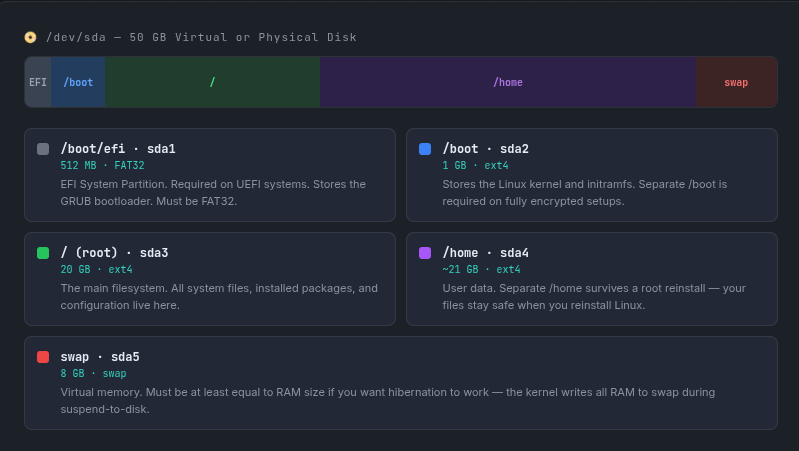
Recommended Partition Layout
This is the partition layout recommended in Chapter 2 for a 50 GB disk. The book explains why each partition exists and what happens if you skip it.
After Installation · Scripts
Post-Install Scripts
These scripts automate the post-installation steps from Chapter 2. Copy and paste into your terminal — each is commented so you know exactly what it does.
01-update-system.sh
Updates all packages and removes unnecessary dependencies. Always run this first after a fresh install.
#!/bin/bash
# 01-update-system.sh — Update Ubuntu after fresh install
# Website: nextsteplinux.com/lf2

echo "Starting system update..."

# 1. Refresh package list from all repositories
sudo apt update

# 2. Upgrade all installed packages
# 3. Handle dependency changes (removes old deps if needed)
# Using 'full-upgrade' often covers what 'upgrade' does, but running both is safe.
sudo apt full-upgrade -y

# 4. Remove packages no longer needed
sudo apt autoremove -y

# 5. Clean up downloaded package cache to save space
sudo apt clean

echo "System updated successfully!"
02-install-essentials.sh
Installs the tools used throughout the rest of the book. Run after updating the system.
#!/bin/bash
# 02-install-essentials.sh — Install tools used throughout the book
# Website: nextsteplinux.com/lf2

echo "Installing essential tools..."

# Install core utilities and networking tools
sudo apt install -y \
    curl \
    wget \
    git \
    vim \
    nano \
    net-tools \
    htop \
    tree \
    build-essential \
    man-db \
    bash-completion

# Note on specific tools for readers:
# - net-tools: Includes 'ifconfig' and 'netstat' (Standard exam commands)
# - build-essential: Includes 'gcc' and 'make' (Needed for Chapter 17 scripting)
# - man-db: Provides manual pages (Essential for exam prep)
# - bash-completion: Enables tab completion for faster command entry

echo "Essential tools installed successfully!"
03-verify-install.sh
Installs the tools used throughout the rest of the book. Run after updating the system.
#!/bin/bash
# 03-verify-install.sh — Verify Ubuntu installation
# Website: nextsteplinux.com/lf2

echo "=========================================="
echo "      SYSTEM VERIFICATION REPORT          "
echo "=========================================="

# 1. Ubuntu Version
echo -e "\n--- Ubuntu Version ---"
lsb_release -a

# 2. Kernel Version
echo -e "\n--- Kernel Version ---"
uname -r

# 3. Disk Layout and Filesystem Usage
echo -e "\n--- Disk Layout ---"
lsblk
echo -e "\n--- Filesystem Usage ---"
df -h

# 4. Memory and Swap Status
echo -e "\n--- Swap Status ---"
swapon --show
echo -e "\n--- Memory Usage ---"
free -h

# 5. Network Connectivity
echo -e "\n--- Network Connectivity ---"
if ping -c 2 google.com &> /dev/null; then
    echo "Status: Network OK"
else
    echo "Status: Network FAILED"
fi

echo -e "\n=========================================="
echo "          Verification Complete           "
echo "=========================================="